

Tableau Extract Refresh Trigger
The Tableau Extract Refresh Trigger application triggers extract refresh tasks on Tableau data sources and workbooks directly from a Keboola flow. It supports both full and incremental refresh types, and can either wait for all triggered tasks to complete (poll mode) or fire and finish immediately.
Prerequisites
Section titled “Prerequisites”- Tableau Personal Access Token (PAT) — required since February 2022
- The token owner must be the data source owner or a Site Admin in Tableau
- All data sources and workbooks must be published to Tableau Online/Server with the required extract refresh tasks already configured
Authorization
Section titled “Authorization”The component authenticates using a Personal Access Token (PAT). Follow the Tableau documentation to create one.
Create a separate PAT for each configuration. Tableau allows only one active session per token, so configurations that share one interrupt each other when they run at the same time. See Concurrency and shared tokens.
Create New Configuration
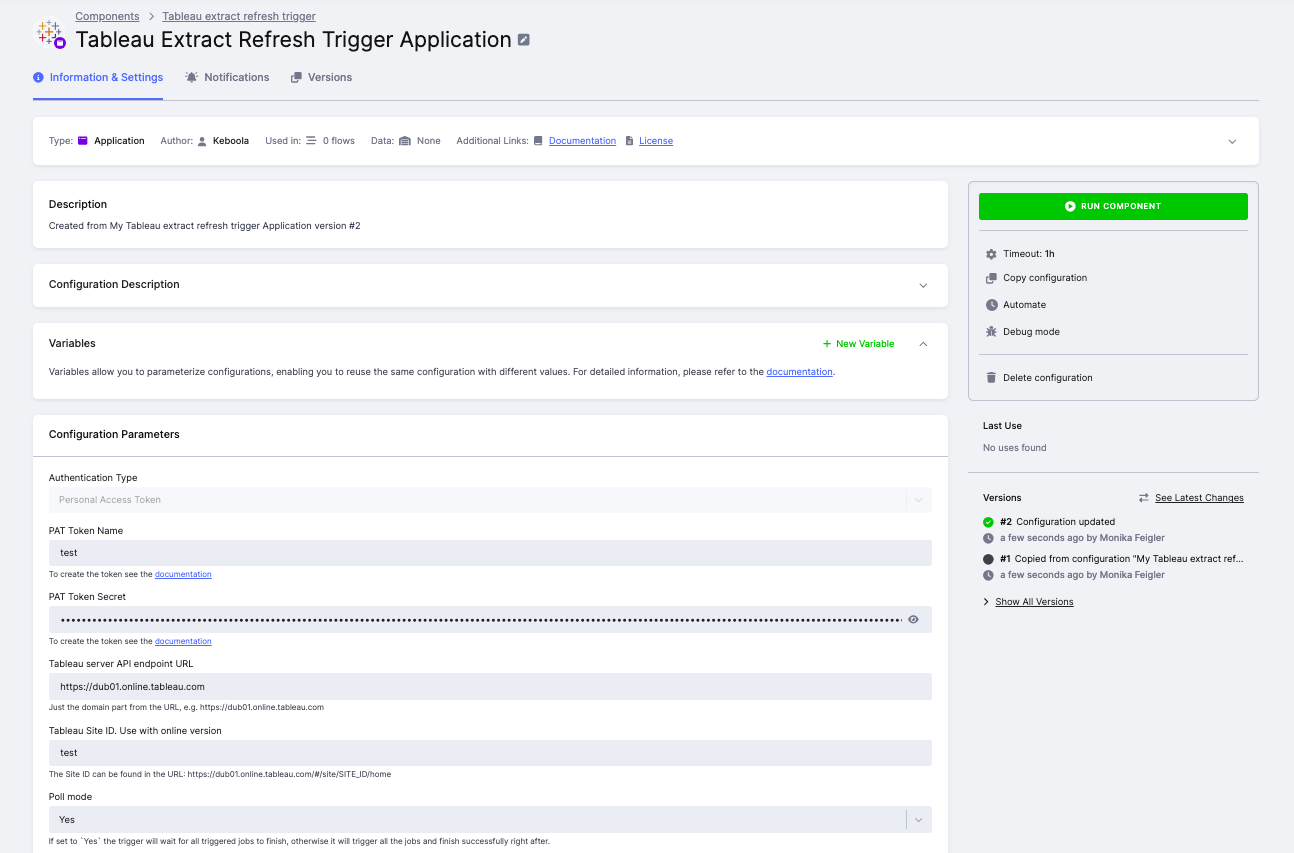
Section titled “Create New Configuration”Create a new configuration of the Tableau Extract Refresh Trigger application and fill in the parameters below.
Authentication
Section titled “Authentication”- PAT Token NameTableau user’s Personal Access Token name.
- PAT Token SecretTableau user’s Personal Access Token secret.
- Tableau server API endpoint URLThe domain of your Tableau server, e.g.,
https://dub01.online.tableau.com. - Tableau Site IDThe Site ID from the URL, e.g.,
SITE_IDinhttps://dub01.online.tableau.com/#/site/SITE_ID/home. Required for Tableau Online.
Poll Mode
Section titled “Poll Mode”If set to Yes, the component waits for all triggered refresh tasks to finish before completing. If set to No, it triggers all jobs and finishes immediately after.
In poll mode the job stays in the processing state for as long as the refresh takes, and that time is billed. A job that loses its Tableau session while polling does not fail fast; see Concurrency and shared tokens.
Continue on Error
Section titled “Continue on Error”If enabled, the component continues refreshing remaining data sources or workbooks even if one of them fails.
Tableau Datasources and Workbooks
Section titled “Tableau Datasources and Workbooks”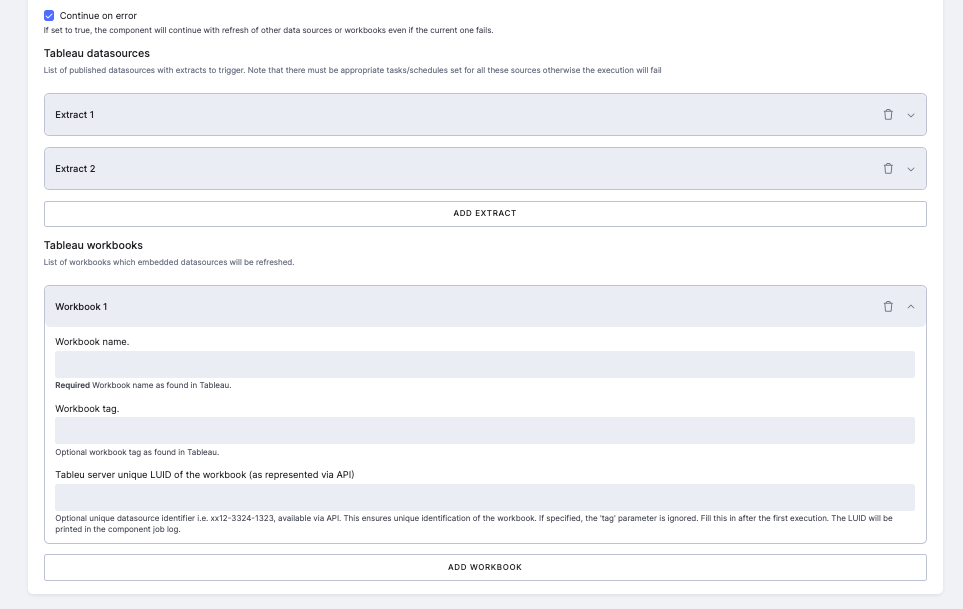
Tableau datasources — list of published data sources with extract refresh tasks to trigger.
Tableau workbooks — list of workbooks whose embedded data sources will be refreshed.
For each datasource or workbook, fill in:
| Parameter | Description |
|---|---|
| Name | Name as displayed in the Tableau UI. Must be unique — if multiple matches exist, the job fails and lists all candidates with their tags. |
| Tag | Optional. Use to disambiguate when multiple sources share the same name. Acts as an additional filter; omitting it returns all matches regardless of tags. |
| LUID | Optional. The unique server identifier (e.g., ecf7d5e0-c493-4e03-8d55-106f9f46af3b). If specified, tag is ignored. Recommended for production configurations. |
| Refresh type | (Datasources only) Either RefreshExtractTask (full) or IncrementExtractTask (incremental). The specified task type must already exist in Tableau. |
Finding the LUID: On first run, the LUID for each matched datasource or workbook is printed in the job log. Copy it into the configuration to ensure stable, unique identification in future runs.
Sample Configuration
Section titled “Sample Configuration”{ "parameters": { "token_name": "my-pat-token", "#token_secret": "XXXXX", "site_id": "testsite", "endpoint": "https://dub01.online.tableau.com", "poll_mode": true, "datasources": [ { "name": "FullTestExtract", "type": "RefreshExtractTask", "luid": "ecf7d5e0-c493-4e03-8d55-106f9f46af3b" }, { "name": "IncrementalTestExtract", "type": "IncrementExtractTask", "luid": "ecf7d5e0-a345-4e03-8d55-106f9f46af1g" } ], "workbooks": [ { "name": "Sales Dashboard", "luid": "ab12-3456-7890-abcd-ef1234567890" } ] }}Concurrency and shared tokens
Section titled “Concurrency and shared tokens”Tableau allows only one active session per Personal Access Token. From the Tableau documentation:
Users can’t request concurrent Tableau Cloud sessions with a PAT. Signing in again with the same PAT, whether at the same site or a different site, will terminate the previous session and result in an authentication error.
If two configurations share one PAT and their runs overlap, the second sign-in terminates the first job’s session. That first job has already triggered its extract refresh, so the refresh itself proceeds normally in Tableau and nothing there looks wrong. Only the Keboola job fails, on its next status check:
Failed to get job status for 'My Datasource': Failed Sign In Error: 401002: Unauthorized Access Invalid authentication credentials were provided.With Poll mode set to Yes, the component logs this as a warning, waits 60 seconds and checks again using the same terminated session. It does not sign in again, so the job normally keeps polling until the platform stops it at the one-hour container timeout. The full hour counts as job runtime and is billed as time credits. Less often the same terminated session surfaces straight away, as a Tableau authentication failed job error a few minutes in.
A 401002 on its own does not prove a token collision, since Tableau also returns it for credentials that are wrong or expired. It points to one when the job had already signed in successfully and only started failing partway through.
Keeping configurations apart
Section titled “Keeping configurations apart”Configurations that share a PAT must not run at the same time. This includes tasks inside a single flow, not just separate flows: phases execute sequentially, while tasks within a single phase run in parallel, so two triggers placed in the same phase start together. Move one of them to a later phase, or stagger the flows that run them.
A separate PAT per configuration removes the constraint instead of working around it, and is the more durable fix once you have more than a couple of configurations.
If a flow does not need to know whether the refresh finished, set Poll mode to No. The component triggers the refresh and finishes in seconds, so there is no polling window to lose the session in and no hour of runtime to pay for. The trade-off is that the flow no longer reports whether the Tableau refresh itself succeeded.
- Each datasource must have the required extract refresh task configured in Tableau (e.g., Full refresh or Incremental refresh) — otherwise the trigger will fail.
- If multiple tasks of the same type exist on a datasource, only one will be triggered.
- Data source names are not guaranteed to be unique. Always set the LUID after the first run to avoid ambiguity.